
Green Screen &
Autocue Services
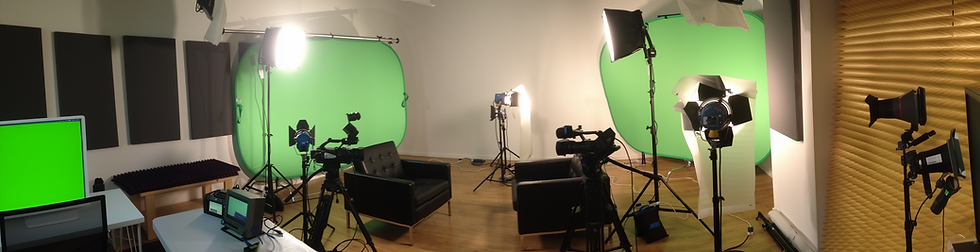
At Ceres Productions, we are fully equipped with large,portable pop-up green screens and professional teleprompter (autocue) systems. These tools can add significant production value and polish to your video content when used correctly.
However, simply having the equipment is only half the battle. To ensure a professional result—where the background looks seamless and the delivery feels natural—the setting and the preparation must be right. We believe in being honest with our clients: if the location or the script isn't suited to these tools,the final result will suffer.
Here is our professional guide to getting the best out of these technologies.
Green Screen (Chroma Key) Production
Green screen technology allows us to transport your speaker to any environment, place them inside a presentation, or create a clean, corporate studio look from a standard meeting room.
However, a high-quality "key" (where the green is removed without jagged edges or green "spill" on the subject) requires a controlled environment. We advise that clients consider the following logistics before booking a green screen shoot:
-
Space is Critical: Depth is just as important as width. To prevent green light from bouncing back onto the subject (which makes the edit look amateurish), we need 6 to 10 feet (2–3 meters) of separation between the subject and the screen. We then need a similar distance between the subject and the camera. (Note: If using an autocue, we prefer even more distance to the camera to minimize visible eye movement.)
-
Total Light Control: Green screens require even,consistent lighting. We need a room with no windows, or windows with full blackout capabilities. Standard office "ribbon blinds" or thin curtains that let in slivers of light will ruin the shot.
-
Side Clearance: We need ample space on either side of the screen to position lighting stands safely, ensuring they don't creep into the frame.
-
Wardrobe Advice: A small but vital detail—please ensure speakers do not wear green! We also recommend avoiding fine patterns (like herringbone jackets) or frizzy hair, as these can be difficult to separate cleanly from the background.
Autocue & Teleprompter Services
An autocue can be a safety net for a nervous speaker, but it can also be a barrier to connection. We often find that clients assume an autocue is "easier," only to find that reading a script while trying to look natural is a skill in itself.
When do we recommend an autocue? We generally advise against using a teleprompter unless your project meets specific criteria:
-
Complexity: You need to convey highly technical data,compliance information, or figures that cannot be memorized accurately.
-
Continuous Takes: You need to deliver a long message in a single, unbroken take, without the option to use "cutaway" shots (B-Roll) to mask edits.
The "Eye-Scan" Trap The most common issue with untrained autocue users is "eye-scan." As the subject reads the scrolling text, their eyes visibly dart back and forth. Their tone often flattens, and they stop communicating with the audience and start reciting. Authenticity is lost, and the viewer disconnects.
Why "Cheating" Doesn't Work We have seen many clients decline an autocue but then attempt to use "cheat sheets"—whiteboards positioned behind the camera or notes stuck to the tripod. We strongly advise against this. It is immediately obvious to the viewer that the speaker is looking away from the lens. It breaks eye contact and trust more severely than a stumble or a pause ever would.
How to Achieve the Best Result
Often, the most authentic video comes from speaking from the heart, not a script. If we are editing the final video with overlay footage (B-Roll), we can easily cut together several shorter,natural takes to create a perfect flow without needing a teleprompter.
If you decide an autocue is necessary, here is how to prepare:
-
Write for the Ear, Not the Eye: Do not paste a formal written report into the teleprompter. Scripts must be written as people speak. Use contractions (e.g., "we're" instead of "we are") and colloquial phrasing.
-
Read it Out Loud: Before the shoot, read your script aloud. If you stumble over a phrase, rewrite it. If a sentence leaves you gasping for breath, break it up.
-
Use it as a Prompt, Not a Bible: Familiarize yourself with the text so thoroughly that you only need to glance at the words to stay on track.
-
Pacing and Emphasis: Don't rush. Speak with ample pauses. Deliberately emphasize and de-emphasize key words just as you would in natural conversation.
Unsure which approach is right for you?
We are happy to assess your script and your venue to recommend the best production method. Contact Us Today to discuss your project requirements.